















In this tutorial, I’m going to show you how to create a customer account with Plesk.

So, first of all, click customers in the menu on the left. And then, click add a customer.
Adding Customer Details to Create a Account with Plesk

Then, you’ll need to enter the customer details. Basically, with a red star has to be entered it’s, you know, compulsory. Everything else is optional. So let’s create an customer account for our famous Elvis Plesky. There we go. As I said, the rest is optional. So, I could fill that in if I had the information.
Credentials for the Customer
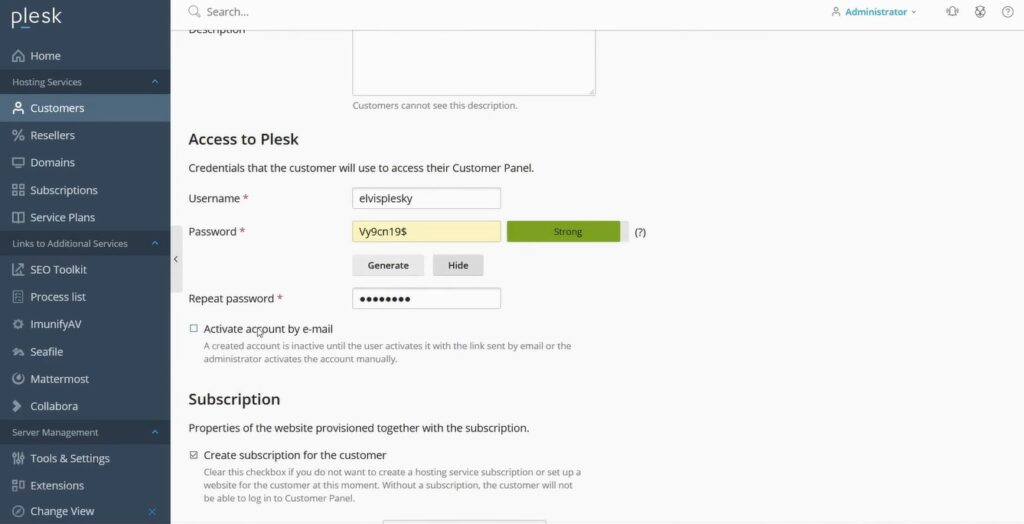
And what we also need is a username and a password. The auto-generation will automatically give you a strong password. And you can display this and you see it’s random and contains special characters, numbers, and letters.
For security, what you can do is you can have it activate the account by email. Which would then send
an email to the customer. So that he would have to click a link to activate his account. This would verify that his email address is correct.
Also, we have the option while we’re doing this to create a subscription for the customer account. We can also give him a separate username and password for administering the website.

We can also select which service plan we want to give it whether or not we want to give it any add-ons. And whether we want to secure with an SSL certificate or enable Git support as with the creating a subscription. Which we cover in one of our other articles.
And then we just click ‘Ok’, and the system goes off in the background. Creates the account, creates a
subscription and does everything for us.
Access Customer Panel

And as you will see, this does not take long at all. And there we are! Customer is created. And as administrator you also have the option to simulate the user.

And there you can see the user’s account, complete with his subscription.
So, thanks very much for reading how to create a customer account with Plesk. And please make sure to check out the other tutorials in this series, where we’ll show you some of the other features of Plesk. Visit our blog page.


