






The Official DevClouds Blogs

logo-devclouds

How to configure AWS Cloudfront with your wordpress

January 22, 2023

How to configure AWS Cloudfront with your wordpress

This article is about how to configure aws cloudfront with wordpress website. So you need to just do this you need a wordpress with a wordpress website and an aws account.

Creating User
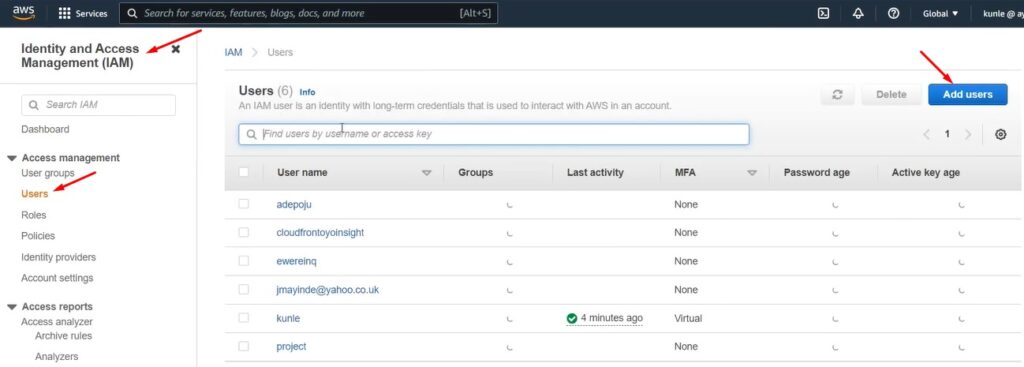
Creating User to configure AWS Cloudfront

This is my aws management console so the first thing is that you go to IAM. So once you get to IAM you go to your users then you are going to add your new users.
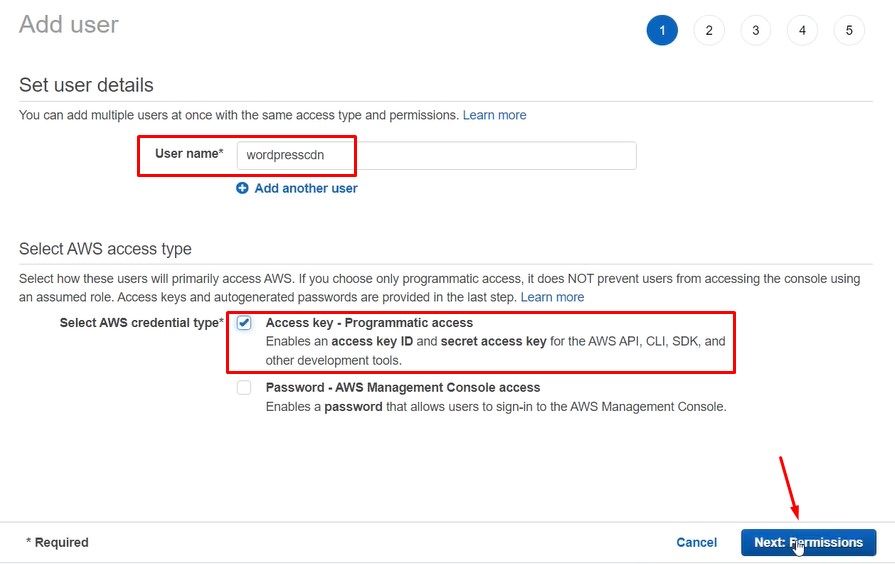
new user

For you to add new user for this I’m going to call it “wordpresscdn” you’re going to give it an “access key programmatic access”.
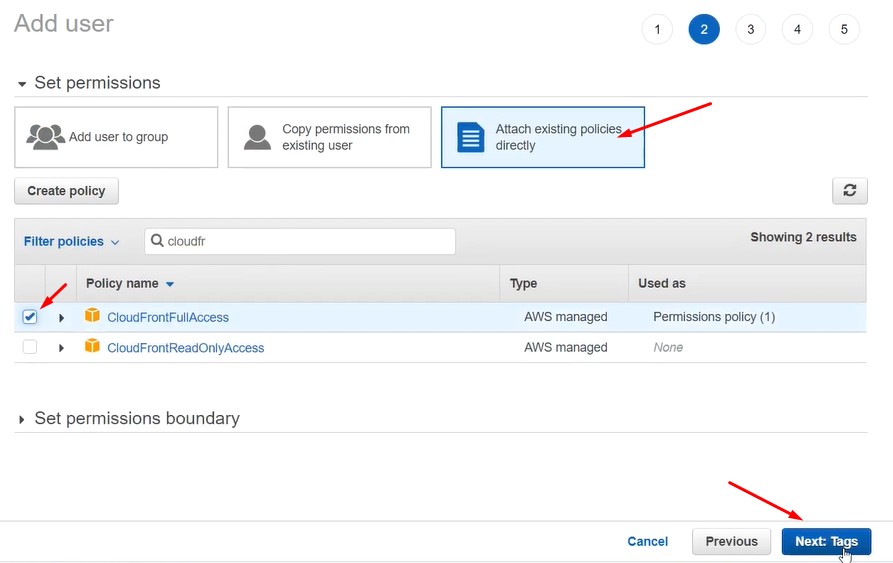
Policies

So you go to nest then we are going to attach an existing policy. For me i’m going to search for cloudfront. So I’ll give it CloudFrontFullAccess.
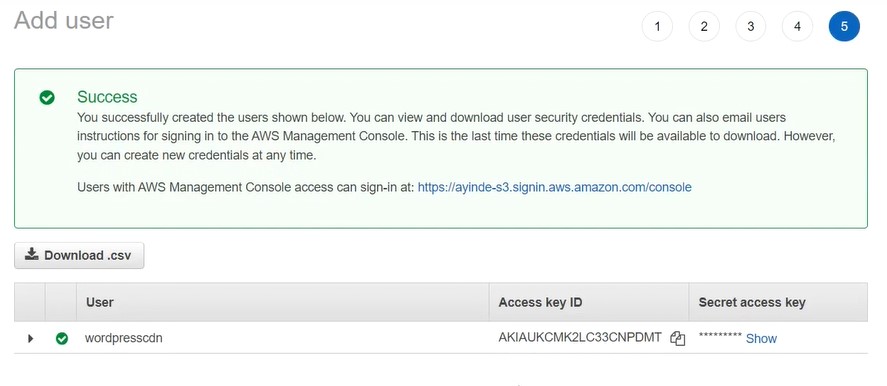
Access key

Then go to next it will ask for add tags which i leave as it is then next to review. Then i have my access key from cloudfront. So the user has been created we have our access key id and our secret id. The access key id is just just like username my password. Please don’t share with any other person.

Installing WPAdmin AWS CDN plugin
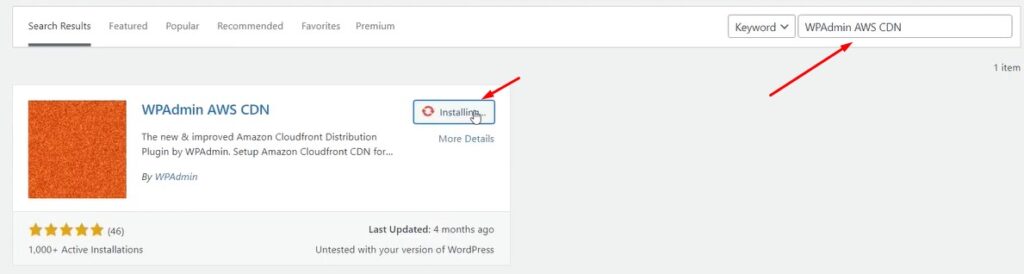
wpadmin aws cdn plugin to configure AWS Cloudfront

So i have my website designed in wordpress so i go to plugin. I go to add new plugin and search for “wpadmin aws cdn” is the plugin we’ll be using in order to connect our wordpress to aws cdn.

I’ll install it then i’ll activate it once my wordpress plugin has been activated. I will go down to where my plugin is and click setup.
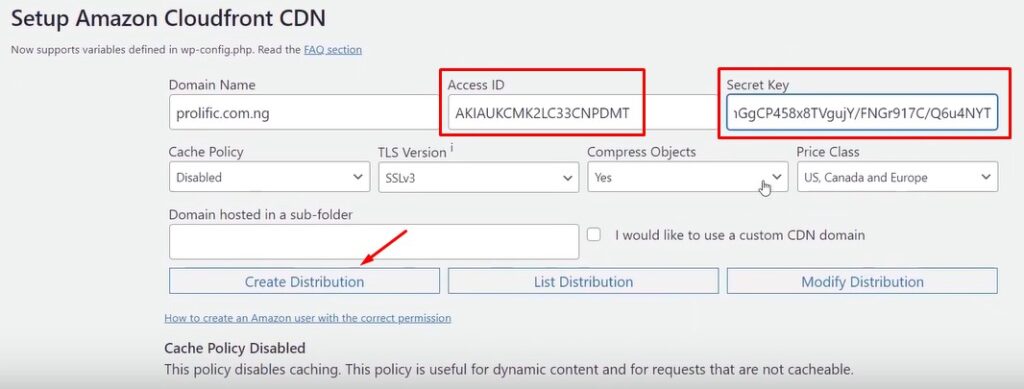
Setup Amazon Cloudfront CDN

from the setup environment it’s asking me to have my access key and secret access key. You remember so i’ll go back and copy my access key id and my secret key access so i paste it here.

And i’ll create a distribution that it’s going to connect my wordpress to my aws cdn.

Configure aws cloudfront with wordpress activated

Active

Finally you can see i’ve successfully connected it. so i’m going to reload the page. After you have reloaded the page. Wow it’s saying CDN is active.
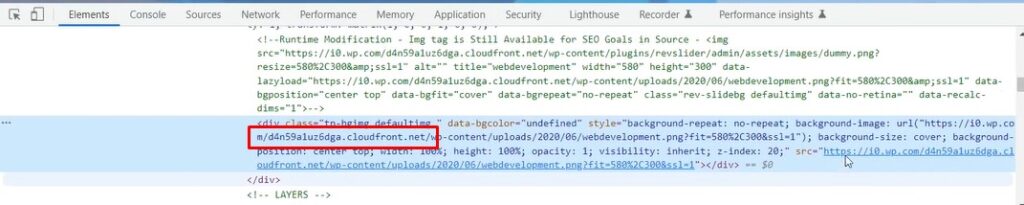
Inspect AWS Cloudfront configured

I will go to my website then right click and try to inspect you can see that my site is being serve from cloudfront.

If you want to learn more you can visit our blog page.

Share This Article

Join our newsletter & get update, It’s That Simple!

Join, Blogs, Discount & Promo code !!!

THERE’S MORE TO READ.

Content delivery network serves a lot of benefits to the users including better performance reliability and security for web properties.

| January 22, 2023

Take a look at the free version of cloudflare, How to Use Cloudflare to Speed up and Secure your Website.

| January 21, 2023

Leave a Reply

Your email address will not be published. Required fields are marked *

Cyber​​Power Cloud, fast, protected virtual servers, instant setup.

Spin up your choice of virtual machine in just 55 seconds.

OVH

Cloud VPS & Dedicated Servers, advanced hosting solutions

Amazon Lightsail provides easy-to-use cloud resources for web applications

Managed Google Cloud Virtual Machines

Easily deploy cloud servers and storage worldwide

Cloud VPS & Dedicated Servers, advanced hosting solutions

Cloud optimized for performance equipped with fast NVMe drives.

AWS

Amazon EC2, the broadest and deepest compute platform

Managing complex cloud infrastructure made easy

High-Performance Cloud Storage Solutions

10 Clouds 1 Panel

Fully managed by our team

All your clouds and dedi's

All your control panels (CP,DA)

All your wordpress sites&plugins

All of that in one CyberPower

Mega control panel

Reliable Co-Location in ISRAEL Service

Buy and add server hardware components to your co-located servers.

Attacked? We Can Defend You!

Advanced DevOps Services

All about us and what we do in cyberpower

Contact us to activate your custom affiliate plan

Terms & Conditions, Privecy Policy